Lifestyle
How a USB C Cable and USB C Docking Station Improve Your Everyday Connectivity

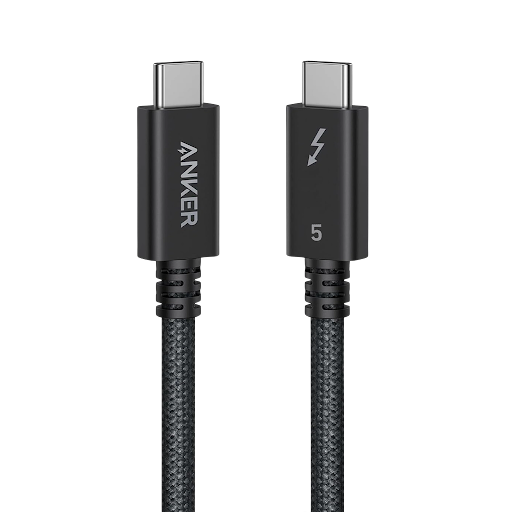
Modern technology has changed the way people work, study, and enjoy digital entertainment. Laptops, smartphones, tablets, and monitors are now essential parts of daily life. However, connecting multiple devices can sometimes become confusing. This is where a USB C cable and a USB C docking station become useful tools for creating a more organized and efficient workspace.
Whether you work from home, manage an office, or travel frequently, choosing the right connectivity accessories can improve your experience. Understanding how these products work and what features matter can help you make a smarter purchasing decision.
What Makes USB-C Technology So Useful?
USB-C has become a popular connection standard because of its compact design and versatile capabilities. Unlike older USB connectors, USB-C features a reversible plug that works regardless of which side faces upward. This simple design makes connecting devices faster and more convenient.
Depending on the device and supported specifications, USB-C can transfer data, deliver power, and carry video signals through one connection. This versatility reduces the need for multiple cables and makes modern electronics easier to use.
However, not every USB-C connection offers the same performance. Supported charging speeds, data transfer rates, and display capabilities depend on the cable, connected devices, and relevant standards. Understanding these differences helps users avoid compatibility problems.
Why Choosing the Right USB C Cable Matters
A USB C cable is more than a simple charging accessory. It can support several important functions, including powering devices, transferring files, and connecting compatible displays.
For example, students may use one cable to charge a laptop or smartphone, while professionals might need faster data transfers for large documents and media files. Photographers and content creators can also benefit from suitable cables when moving files between compatible devices.
Before buying a cable, consider its intended purpose. A cable designed primarily for charging may not provide the same data performance as one built for high-speed transfers. Similarly, video output requires compatible hardware and a cable that supports the necessary features.
Understanding Charging Speed and Data Transfer
Charging performance is an important consideration when selecting a USB-C accessory. Some cables support higher power levels than others, while actual charging speed depends on the charger, device, and supported charging protocol.
Data transfer speed also varies. Basic cables may be sufficient for everyday charging and small file transfers, but demanding tasks can require cables with higher bandwidth.
Check the product specifications carefully instead of relying only on the connector’s appearance. Two cables can look almost identical while offering different capabilities. Choosing a cable that matches your requirements helps prevent unnecessary delays and ensures better compatibility.
What Is a USB C Docking Station?

A USB C docking station is a connectivity accessory that expands the available ports on a compatible laptop, tablet, or other device. It can provide connections for external monitors, keyboards, mice, storage drives, wired networks, and additional USB accessories.
Many modern laptops have limited built-in ports. This can become inconvenient when users need to connect several devices simultaneously. A docking station addresses this challenge by bringing multiple connections together in one convenient hub.
Depending on its design, a docking station may include HDMI or DisplayPort outputs, USB-A ports, additional USB-C connections, Ethernet, audio connections, and memory card readers. Some models also support power delivery, allowing a compatible laptop to receive power through the same connection used for docking.
Benefits of Using a USB C Docking Station
One major advantage of a docking station is convenience. Instead of connecting individual accessories every time you sit down to work, you can connect compatible peripherals through one central device.
This setup is particularly useful for people who use external monitors, full-sized keyboards, and other desktop accessories. Connecting a laptop to a docking station can quickly transform a portable computer into a more complete workstation.
A docking station can also reduce cable clutter. Keeping frequently used accessories connected to one device makes a desk easier to organize and maintain.
For businesses, docking stations can help create consistent workspaces for employees who regularly move between meetings, shared desks, and home offices.
How a USB-C Cable Works With a Docking Station
A suitable USB-C cable can connect compatible computers and docking stations, allowing supported data, power, and display functions to operate through one connection.
However, compatibility is essential. Some docking stations include a permanently attached cable, while others have a separate host connection. Replacing that cable with an unsuitable alternative may limit performance or prevent certain features from working.
For example, a docking station designed for multiple high-resolution displays may require a compatible USB-C connection with specific video capabilities. A basic charging cable might not provide the bandwidth needed for that setup.
Always review the docking station’s technical requirements and your computer’s supported features before purchasing additional accessories.
Important Features to Consider Before Buying
Choosing the right connectivity products becomes easier when you identify your everyday needs.
1. Power delivery: Check whether the cable and docking station support the power level required by your laptop or other device.
2. Data transfer: Look for the supported transfer rate if you frequently move large files or use external storage.
3. Display compatibility: Confirm the supported resolution, refresh rate, and number of external displays.
4. Port selection: Choose a docking station with enough ports for your keyboard, mouse, monitor, storage devices, and network connection.
5. Build quality: Durable connectors, reliable construction, and appropriate cable length can improve everyday usability.
6. Device compatibility: Verify operating system support, USB-C capabilities, and any manufacturer-specific requirements before making a purchase.
These details can help you avoid paying for unnecessary features while ensuring that your accessories meet your actual needs.
Creating a Better Home Office Setup
A well-organized home office can improve comfort and productivity. A compatible docking station allows users to connect an external monitor, keyboard, mouse, and other peripherals without repeatedly plugging each accessory into the laptop.
Combining this setup with a suitable USB-C cable can make charging and connectivity more straightforward. Users can keep essential accessories connected at their desks and disconnect their laptops when they need to leave.
Cable management also matters. Keeping wires organized reduces clutter, makes devices easier to access, and creates a cleaner working environment.
For remote workers, freelancers, and students, this combination can provide a practical balance between portability and desktop convenience.
Common Mistakes to Avoid
One common mistake is assuming that every USB-C cable supports every available feature. Connector shape alone does not guarantee fast charging, high-speed data, or video output.
Another mistake is purchasing a docking station without checking laptop compatibility. Some computers support external displays through USB-C, while others have different limitations. Certain advanced docking stations may also require specific software or technologies.
Users should avoid choosing products based on port count alone. A docking station with many connections may not offer the performance needed for demanding tasks.
Reading specifications and checking compatibility before buying can save money, prevent frustration, and help ensure a reliable setup.
Final Thoughts
Reliable connectivity is essential for modern work and everyday technology use. A suitable USB C cable can support charging, data transfer, and other functions, depending on its specifications. Meanwhile, a USB C docking station can expand connectivity and simplify the process of building a productive workspace.
The best choice depends on your devices, daily activities, and performance requirements. By checking power delivery, data speeds, display support, port selection, and compatibility, you can choose accessories that work together effectively.
Whether you are upgrading a home office, improving your laptop setup, or organizing multiple devices, investing in compatible connectivity accessories can make everyday technology more convenient and efficient.


Who Is Elisa Larregui? The Real Life Story of Aries Spears’ Former Wife

Who Is Solita Liliana Rivera? The Real Life Story of Geraldo Rivera’s Youngest Daughter

Who Is Alyssa Cuban? The Real Life Story of Mark Cuban’s Middle Daughter

Who Is Andrea Skeete? The Real Life Story of George Foreman’s Fourth Wife

Who Is Juanita Katt? The Real Life Story of Barbara Hale’s Daughter

Who Is Asher Sky Waite? The Real Life Story of Natasha Henstridge’s Younger Son

Who Is Thomas Emil Sicks? The Inspiring Life of Kiefer Sutherland’s Half-Brother

Who Is Aidan Thieriot? The Inspiring Life of Max Thieriot’s Brother

Who Is Michel Sáenz Castro? The Fascinating Life of Verónica Castro’s Son

Who Is Amelia Jane Henson? The Fascinating Life of Mia Sara and Brian Henson’s Daughter

Who Is América Guinart? A Remarkable Life of Alejandro Fernández’s Ex-Wife

Who Is Paris Brosnan? The Remarkable Life of Pierce Brosnan’s Son
-
 Celebrity2 months ago
Who Is Thomas Emil Sicks? The Inspiring Life of Kiefer Sutherland’s Half-Brother
-
 Celebrity2 months ago
Who Is Aidan Thieriot? The Inspiring Life of Max Thieriot’s Brother
-
 Celebrity3 months ago
Who Is Michel Sáenz Castro? The Fascinating Life of Verónica Castro’s Son
-
 Celebrity2 months ago
Who Is Amelia Jane Henson? The Fascinating Life of Mia Sara and Brian Henson’s Daughter
-
 Celebrity2 months ago
Who Is América Guinart? A Remarkable Life of Alejandro Fernández’s Ex-Wife
-
 Celebrity2 months ago
Who Is Paris Brosnan? The Remarkable Life of Pierce Brosnan’s Son
-

 Celebrity3 months ago
Who Is James Daniel Sundquist? The Extraordinary Life of Jimi Hendrix’s Son
-

 Business2 months ago
What Is LessInvest.com and How Does the Platform Work?